Google Summer of Code 2025 with VideoLAN
Mentors: Felix Paul Kühne, Diogo Simao Marques
Overview
From May to August 2025, I participated in Google Summer of Code (GSoC) with VideoLAN, one of the most impactful open-source multimedia organizations. Under the exceptional mentorship of Felix Paul Kühne and Diogo Simao Marques, I focused on enhancing the user interface and core functionality of the VLC iOS application, with the goal of improving user experience and introducing innovative features for mobile media consumption.
Project Achievements
Throughout the summer, I successfully implemented multiple features that directly impact millions of VLC iOS users worldwide. Here's a comprehensive overview of my contributions:
Achievements Table
| Feature | Repository | MR Link | Status |
|---|---|---|---|
| Allow Dynamic Length Seek on Swipe | vlc-iOS | vlc-ios!1512 | ✅ Merged |
| Custom Default Playback Speed | vlc-iOS | vlc-ios!1500 | ✅ Merged |
| Chinese Subtitles Rendering Fix (iOS 18.0+) | libvlc | Issue #1867 | 🔄 In Progress |
| Save Playback Speed to Metadata on Exit | vlc-iOS | vlc-ios!1526 | ✅ Merged |
| Support Dual Subtitles for Language Learners on iOS | VLCKit VLCMediaLibraryKit vlc-iOS |
VLCKit!371
VLCMediaLibraryKit!62 vlc-ios!1525 |
✅ Merged |
Technical Stack
Languages: Objective-C, SwiftFrameworks: UIKit, VLCKit, MediaLibraryKit
Tools: Xcode, Git, GitLab CI/CD
Platforms: iOS 13.0+, iPadOS
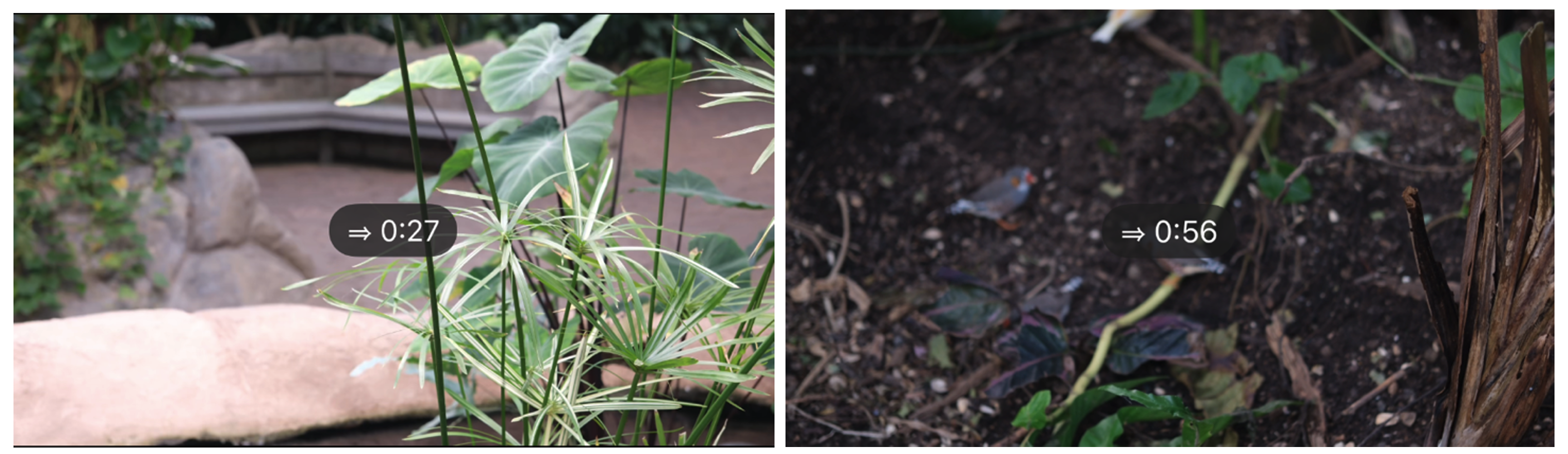
Allow Dynamic Length Seek on Swipe
Problem: VLC-iOS version previously only offered fixed-duration seeking, limiting precise navigation in long videos.
Solution: I implemented a variable-rate seeking system that allows users to navigate through media by swiping horizontally on the screen. The seek distance adapts based on how fast users swipe and the total media duration, making it equally effective for both short clips and long movies. The implementation uses pan gesture recognition to distinguish between horizontal seeking and vertical brightness/volume controls, ensuring smooth coexistence with existing gestures. Real-time visual feedback shows users exactly where they're seeking to, enhancing the navigation experience.
Custom Default Playback Speed
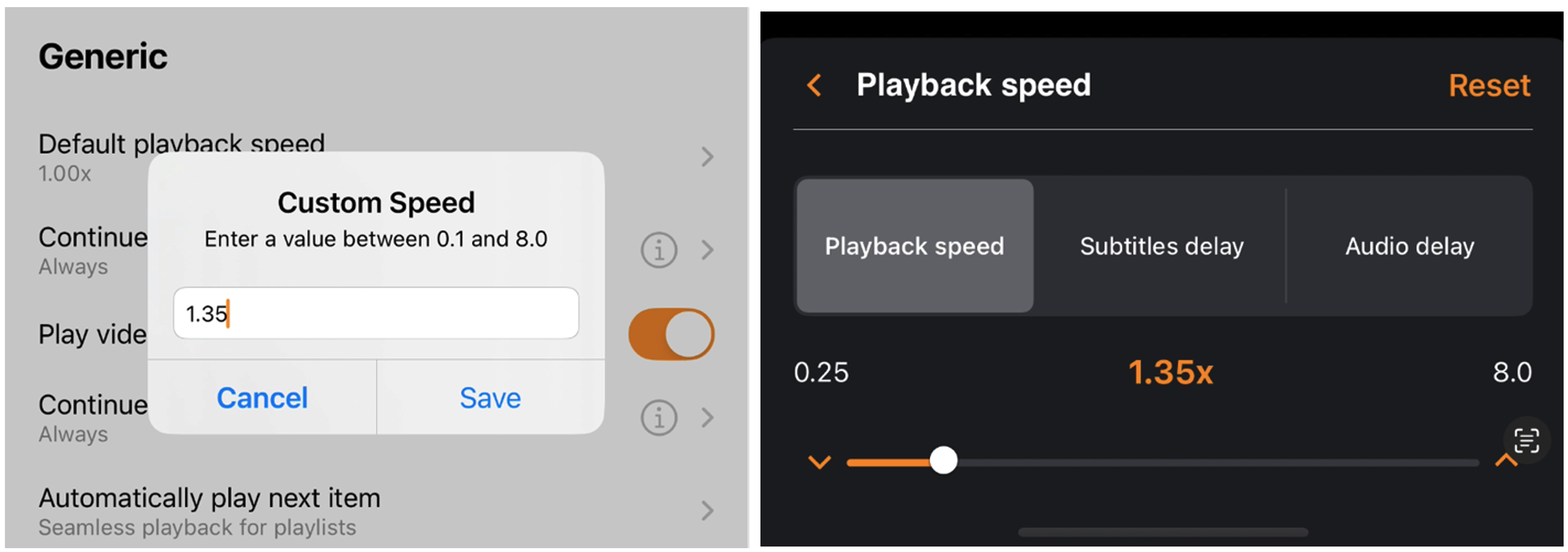
Problem: Users were limited to preset playback speeds, unable to set their preferred custom speeds.
Solution: I developed a feature that lets users input and save any playback speed between 0.25x and 8.0x. The implementation adds a 'Custom' option to the existing speed selector that opens an input dialog where users can type their preferred speed. The system validates input in real-time to ensure it falls within acceptable ranges and saves the custom speed as the default for future playback sessions. This particularly benefits podcast listeners and language learners who often need specific speeds that weren't available in the preset options.
Fix Chinese Subtitles Render Failure in iOS 18.0+
Problem: Chinese subtitles failed to render on iOS 18.0+ devices, appearing as empty boxes/tofu cubes instead of the intended glyphs, affecting millions of users.
Investigation & Discovery: I discovered that Apple changed their Chinese font system in iOS 18+, replacing the standard PingFang font with a new format that standard libraries (FreeType, CoreText) couldn't parse. The new font uses Apple's proprietary HVGL format, which is incompatible with the cross-platform FreeType library that VLC relies on for text rendering. This caused Chinese subtitles to display as blank or garbled text, severely impacting the user experience for Chinese-speaking audiences.
More DetailsSave Playback Speed to Metadata on Exit
Problem: Users had to manually reset playback speed for each media file.
Solution: I implemented a system that remembers the playback speed for each individual media file. When users adjust the speed while watching a video or listening to audio, VLC now saves this preference and automatically restores it the next time they open the same file. This feature is particularly useful for podcast listeners who prefer faster playback or language learners who need slower speeds for comprehension. The speed data is stored alongside other media metadata, ensuring it persists across app restarts.
Support Dual Subtitles for Language Learners on iOS
Problem: VLC iOS v3 lacked support for simultaneous subtitle tracks, limiting language learning and accessibility use cases.
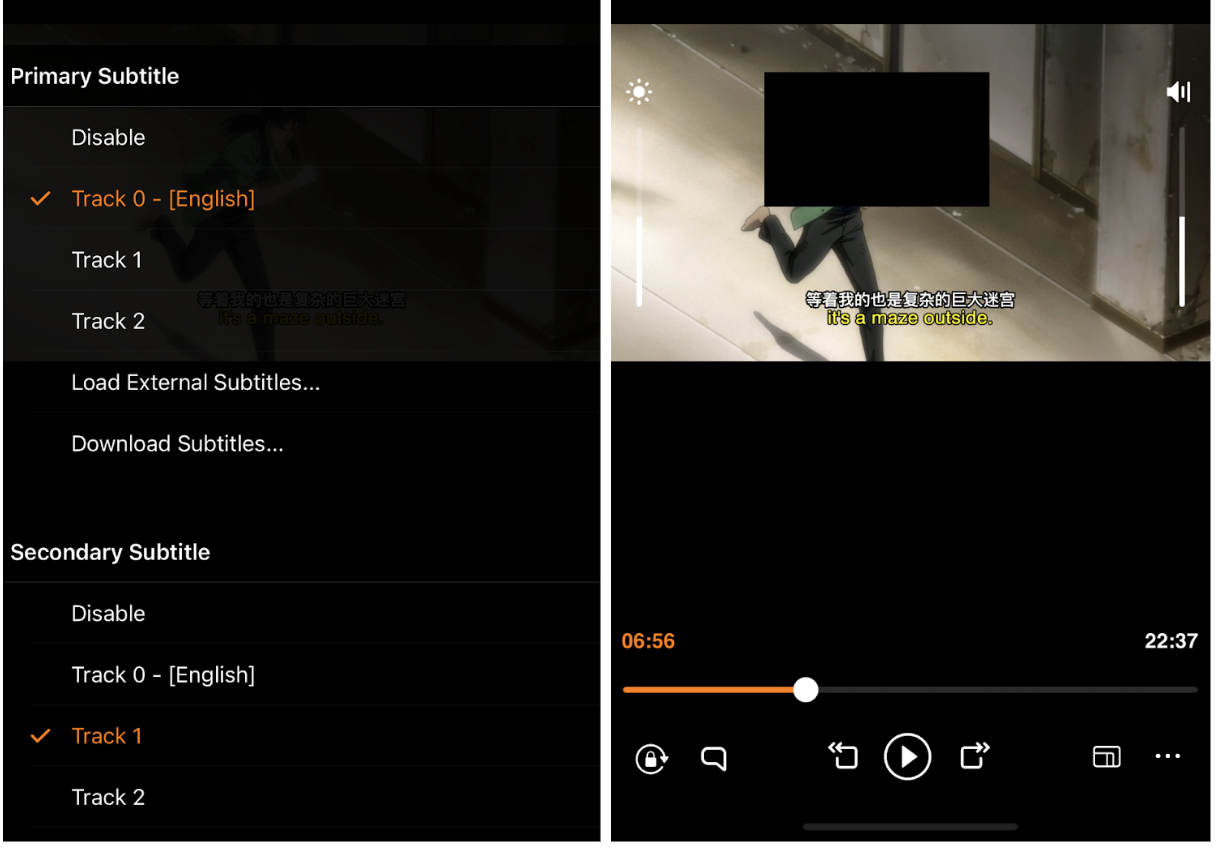
Solution: This feature required coordinated changes across two layers of the VLC iOS stack. At the VLCKit level, I designed and implemented batch subtitle selection APIs that allow atomic selection of multiple subtitle tracks, replacing the previous single-track limitation. This new API prevents race conditions that occurred when users rapidly switched between subtitles, as the old implementation would sometimes result in incorrect or missing subtitle displays. At the iOS application layer, I refactored VLCPlaybackServices to leverage existing and my new VLCKit capabilities, implementing a dual-track management system that maintains state for both primary and secondary subtitles. The UI displays the primary subtitle in the traditional bottom position while the secondary appears above it, with both tracks remaining perfectly synchronized during playback. This enhancement particularly benefits language learners who can now compare original dialogue with translations in real-time, and the atomic selection mechanism ensures reliable subtitle switching even in complex media files with numerous subtitle tracks.
Challenges
Build System Complexity: The most significant initial challenge was understanding VLCKit's complex build system. Successfully building and running VLCKit required applying multiple patches via git am, understanding intricate dependency relationships between modules, and navigating the interaction between the iOS app and underlying libraries.
API Limitations Discovery: Initially, I assumed VLCKit's existing API was fully capable of supporting my planned features. However, through persistent debugging, I discovered that some functionality gaps were actually in the API layer itself—particularly around handling multiple simultaneous subtitle tracks and race conditions in asynchronous media loading. This realization led me to extend VLCKit's capabilities rather than just building on top of it, resulting in improvements that now benefit all VLC apple platforms, not just iOS.
Cross-Platform Compatibility: One of the most educational challenges was dealing with CI pipeline failures across Apple's ecosystem. My merge requests would sometimes pass iOS tests but fail on visionOS, tvOS, or other platforms I hadn't initially considered. This was my first experience parsing through lengthy error logs to identify platform-specific issues—learning that a feature working perfectly on iOS doesn't guarantee compatibility with tvOS's or visionOS's unique requirements. Each failure taught me to write more defensive code and consider the broader Apple ecosystem from the start.
Left to Do
The dual subtitle feature is nearly complete, with one remaining task: implementing persistent storage for the secondary subtitle selection. This requires coordination with the Android team to ensure our MediaLibraryKit modifications align with their implementation, as both platforms share the same underlying media database. Beyond this, I plan to continue refining the features based on user feedback and contributing to VLC's broader ecosystem.
Acknowledgments
I am deeply grateful to my mentors Felix Paul Kühne and Diogo Simao Marques for their support, patience, and expertise throughout this journey. Their thorough code reviews, technical expertise, and patience in answering my questions were invaluable in helping me navigate the complexities of the VLC codebase and deliver quality contributions.
Working with VideoLAN has been transformative. The opportunity to contribute to software used by millions globally, collaborate with talented developers from diverse backgrounds, and tackle complex technical challenges has been invaluable for my professional growth.
Special thanks to the entire VideoLAN community for their welcoming attitude, constructive feedback, and commitment to open-source excellence.